

If you’re new to modern SharePoint development, you’ve probably come across the term SharePoint Framework (SPFx). But what exactly is it? Why does everyone keep talking about it?
In the past, customizing SharePoint often meant dealing with clunky Script Editors, server-side code, or outdated Add-ins. Today, Microsoft’s SPFx makes it possible to build powerful, secure, and responsive web parts using modern web technologies like TypeScript, React, and Node.js – all while integrating seamlessly with Microsoft 365.
In this beginner-friendly guide, we’ll break down what the SharePoint Framework is, how it works, and why it’s the future of SharePoint development. By the end, you’ll know exactly where to start if you want to build your first SPFx web part and take your SharePoint skills to the next level.
What is the SharePoint Framework (SPFx)?
The SharePoint Framework (SPFx) is Microsoft’s modern development model for customizing SharePoint and building rich user experiences across Microsoft 365. Put simply, it’s a way for developers to create client-side web parts, extensions, and custom applications that run directly in the browser – no more clunky iFrames or heavy server-side code.
Before SPFx came along, customizing SharePoint often meant deploying complex server-side solutions or relying on old Script Editors and Add-ins that didn’t always play nicely with the modern SharePoint interface. SPFx was introduced by Microsoft in 2017 as the answer to these limitations – giving developers a way to build responsive, mobile-ready, and secure components using modern web technologies like React, TypeScript, Node.js, and other popular open-source tools.
One of SPFx’s biggest strengths is that it works seamlessly within the user’s browser context – which means the code runs where the user is, ensuring better performance and tighter integration with the SharePoint page itself. This modern approach has quickly become the preferred way to extend SharePoint Online, but it’s not limited to the cloud.
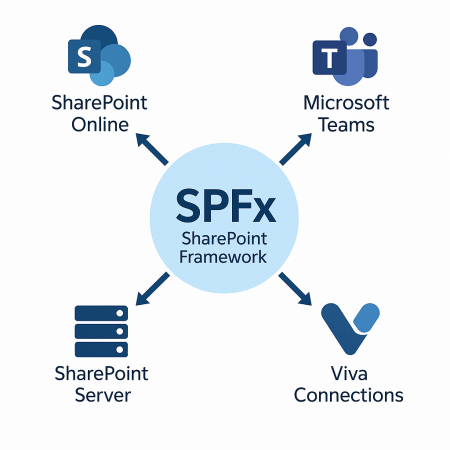
👉 Supported Versions:
- SharePoint Online: Full support for all SPFx features.
- Microsoft Teams & Viva Connections: SPFx is also used to build custom tabs and extensions inside Teams and Viva.
- SharePoint Server: On-premises versions starting from SharePoint Server 2016 Feature Pack 2 also support a limited version of SPFx.
If you’re serious about building modern SharePoint solutions, SPFx is essential. The best part is, you don’t have to be a .NET expert to get started!
Why Use SPFx Instead of Classic Customizations?
So, why bother learning something new like SPFx when SharePoint has had customization options for years? Let’s break it down.
Before SPFx, developers and power users often relied on the Script Editor Web Part, Content Editor, or SharePoint Add-ins to add custom functionality. While these older methods did the job back in the classic SharePoint days, they came with plenty of headaches:
- Script Editor: You’d paste custom JavaScript or jQuery straight into a page. It was quick and dirty – but also fragile, hard to maintain, and risky from a security perspective.
- SharePoint Add-ins: These were a big step forward at the time, running in an isolated iFrame and communicating with SharePoint via APIs. But they often felt disconnected from the page and had limited styling and user experience options compared to the modern SharePoint look and feel.
Enter SPFx. The SharePoint Framework fixes these pain points by giving developers a modern, supported way to build client-side solutions that:
- Run in the page context, not in an iFrame – so they look and feel like part of SharePoint, not a bolt-on.
- Use modern web tech like React, TypeScript, and npm, making it easier to build robust, maintainable solutions.
- Deliver a responsive, mobile-ready experience, automatically adapting to any screen size.
- Respect SharePoint’s security model, running under the current user’s permissions.
- Work seamlessly across SharePoint Online, Microsoft Teams, and Viva Connections, creating one consistent experience across Microsoft 365.
In short: SPFx is modern, secure, mobile-friendly, and fully aligned with how Microsoft wants SharePoint to evolve. If you’re still using Script Editor snippets in 2025, it’s probably time to level up! 🚀

How Does SPFx Work? Key Concepts
At its core, the SharePoint Framework (SPFx) is all about client-side development – meaning your code runs right in the user’s web browser instead of on a SharePoint server. This modern approach makes your customizations faster, more interactive, and easier to maintain.
🔑 Client-Side Development
With SPFx, everything happens in the context of the current page and user. There are no hidden iFrames – your JavaScript runs directly in the page’s DOM, giving you full control over how your components look and behave. Because it’s client-side, you can build dynamic, responsive features without round trips to the server for every interaction.
🔧 Web Parts & Extensions
SPFx solutions are made up of two main building blocks:
- Web Parts – reusable blocks you can add to pages to display content, fetch data, or create custom functionality. Think dashboards, forms, charts, or widgets – all built with modern frameworks like React.
- Extensions – these let you customize the SharePoint user experience in other ways, like adding custom banners (Application Customizers), customizing how fields look in lists (Field Customizers), or adding custom buttons to SharePoint’s command bars (Command Sets).
These building blocks help you deliver tailored experiences that feel like a native part of SharePoint – not just a plug-in stuck on top.
⚙️ Uses a Modern Web Stack
One of the best things about SPFx is that it’s built on modern, open-source tools that web developers already love. SPFx projects typically use:
- TypeScript – a typed superset of JavaScript that helps catch bugs early and keep code organized.
- React (or Angular, Vue.js, or plain JavaScript) – popular frameworks that make it easy to build interactive UIs.
- Node.js, npm, Gulp, and Yeoman – to scaffold projects, manage dependencies, automate tasks, and streamline your workflow.
In short, SPFx brings SharePoint development into the same world as modern web development – so if you know how to build a web app, you’re well on your way to building great SharePoint customizations too.
Benefits of SPFx for Developers & Businesses
So, what makes the SharePoint Framework such a big deal for developers and the organizations they build for? Let’s break down the biggest wins.
⚡ Faster Deployment
With SPFx, you don’t have to wrestle with heavyweight server deployments or complicated farm solutions. Everything runs client-side, so once your web part or extension is ready, you package it, upload it to the SharePoint App Catalog, and it’s instantly available across your tenant. No downtime, no risky full-trust code – just smooth, modern deployment.
🔒 Runs in the Context of the Current User
Unlike older models that relied on server-side code or isolated iFrames, SPFx solutions run directly in the context of the logged-in user. This means your custom web parts respect SharePoint’s built-in permissions and security model – there’s no risky backdoor to the server. If a user doesn’t have permission to see something, your SPFx part won’t expose it.
🛠️ Supports Modern Toolchains
SPFx was designed for today’s developers. You get to work with the tools you’d use for any serious front-end project – npm for managing packages, TypeScript for safer JavaScript, React for rich, interactive UIs, and Gulp/Yeoman for automating builds. This means you can reuse your existing web development skills, collaborate more easily, and stay productive with industry-standard workflows.
🤝 Integrates with Microsoft Teams
Another huge plus: SPFx isn’t just for SharePoint. The same web parts you build can also show up as tabs in Microsoft Teams or as cards in Viva Connections, giving you a consistent experience across Microsoft 365. One framework, multiple surfaces – which means more value from a single development effort.
Together, these benefits make SPFx a win-win: developers get a modern, efficient way to build solutions, and businesses get secure, maintainable customizations that evolve with Microsoft’s cloud ecosystem.
Are There Any Limitations?
As powerful as SPFx is, it’s not all sunshine and rainbows – so it’s good to know what you’re signing up for.
📚 Learning Curve
If you’re coming from classic SharePoint Designer days or simple Script Editor tweaks, SPFx can feel like a big leap. You’ll need to get comfortable with modern web dev tools like TypeScript, npm, Node.js, and frameworks like React. For some teams, this means a bit of upskilling before they can hit the ground running.
🔧 Maintenance of the Toolchain
SPFx relies on a modern toolchain – which is great for flexibility but means you need to keep an eye on Node.js versions, npm packages, and dependencies. If your dev environment gets out of sync (for example, after a big Node.js upgrade), you might run into build issues that need fixing. Staying organized and versioning your environment with tools like NVM (Node Version Manager) helps a lot.
📅 Versioning Challenges
Microsoft actively improves SPFx, which is good – but it also means you’ll occasionally need to upgrade your solutions to stay compatible with the latest SharePoint Online updates. Sometimes older versions of Node.js or certain packages get deprecated, so keeping your projects current is part of the job.
None of these are deal-breakers – but it’s smart to know the trade-offs upfront so you can plan for a smooth development experience.
Final Thoughts
The SharePoint Framework (SPFx) has completely changed how developers customize and extend SharePoint. SPFx embraces modern web development practices. This makes it easier than ever to build solutions that look great and run smoothly. They integrate tightly with Microsoft 365.
Whether you’re a seasoned SharePoint pro or just getting started, learning SPFx is an investment in your future. The first step is easier than you think.
👉 Ready to build your first SPFx web part?
Follow our step-by-step tutorial to prepare the environment and create your first project today!